Getting Started
Everything you need to get started with the Community Wolf platform.
Welcome to Community Wolf. This guide helps you understand the platform, how it connects to WhatsApp agents, and how to get your organisation set up.
If you need access or onboarding support, contact the Community Wolf team at hello@communitywolf.com.
You might hear the platform referred to as Enterprise Wolf internally. In these docs, we call it the Community Wolf platform.
Why Community Wolf expanded into business tools
Community Wolf started with a simple idea: let people report crimes via WhatsApp and surface that intelligence on a map. When we took this to private security businesses, they told us: "That's great, but it's not enough. We need tools to run our operations."
Private security businesses spend most of their time proving to clients that they are doing what they said they would do. Guards need to show they were awake, that they walked the route, that they scanned the vehicles at the gate. The pain is not a lack of information—it's admin, accountability, and auditability.
So we built business tools that solve those problems, all through WhatsApp. The hardware you need is already on site: a phone.
Guarding vs response
Security operations broadly fall into two categories:
- Guarding: Personnel stationed at a property entrance, estate gate, or building—controlling access and monitoring activity.
- Response: Armed or rapid-response teams that react to alarms and incidents.
Community Wolf currently focuses on guarding-oriented workflows: access control, patrols, roster management, and group monitoring. The platform is designed to help guarding businesses prove compliance, reduce admin, and give clients visibility without adding new hardware.
Tool status overview
| Tool | Status | Description |
|---|---|---|
| Access Control | Live | Licence disc and person scanning at gates |
| Patrol Management | Live | Routes, schedules, and checkpoint verification |
| Group Agents | Live | Automated listeners on WhatsApp groups |
| Insights | Live | Scheduled summaries of group activity |
| Roster Management | In development | Shift planning and coverage |
| Safety Survey | Live | Community safety perception surveys |
| Payroll | Coming soon | Timesheet and payroll integration |
What you will configure
- Organisation profile: Your company name, locations, and the teams that operate within the platform.
- Sites and areas: The physical footprint for reports, patrols, and access control filtering.
- Staff and skills: Field staff with WhatsApp capabilities and the skills they can use.
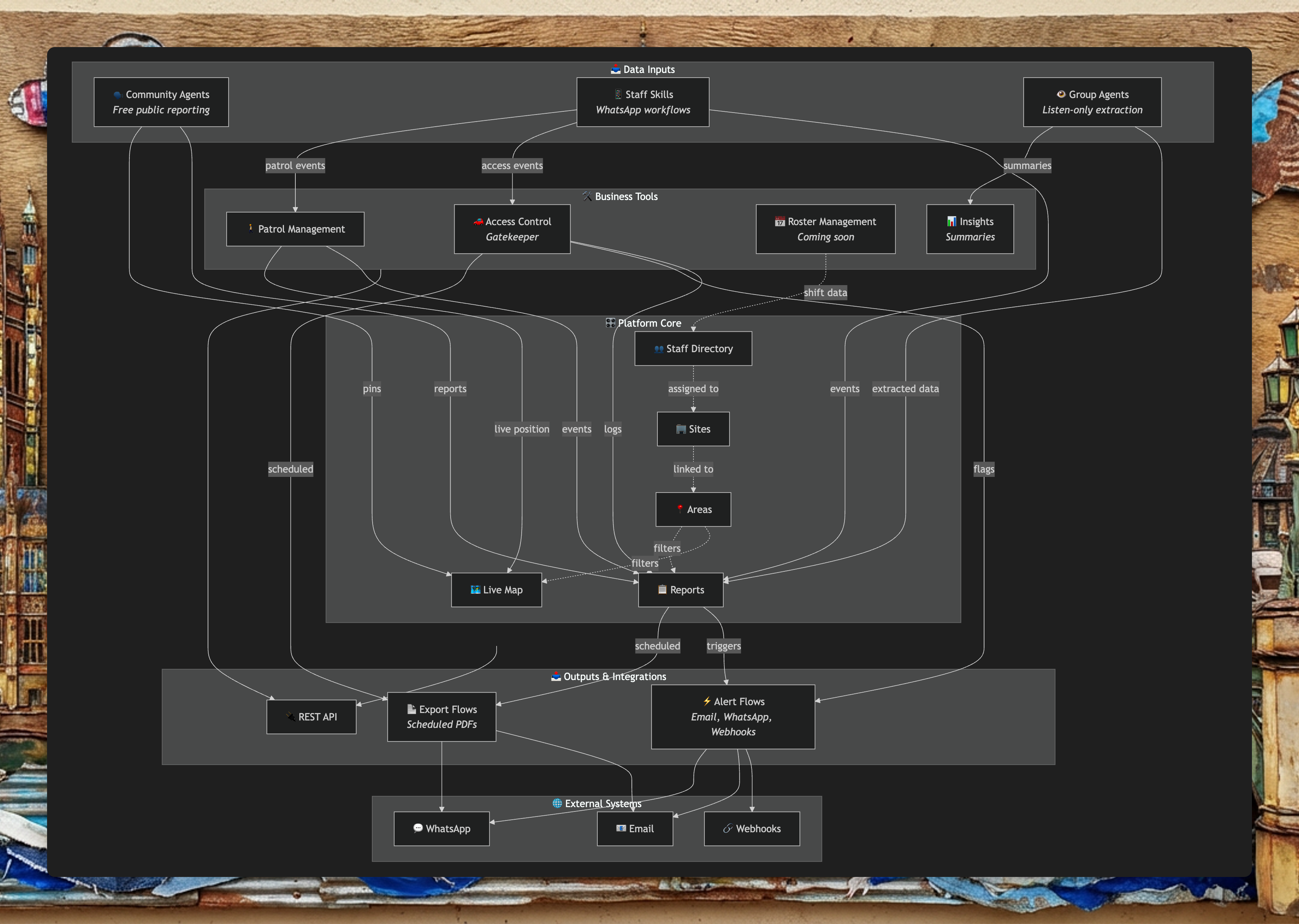
- Business tools: Access Control (Gatekeeper), Patrol Management, Roster Management, Group Agents, and Safety Survey.
- Integrations: Alert flows and export flows to get data where it needs to go.
Guides to start with
Organisation Setup
Configure your organisation, sites, and areas.
Users and Staff
Understand the difference between platform users and field staff.
Quick Tour
A walkthrough of the main platform features.
How it all connects
The Community Wolf platform is the enterprise web application where you configure operations. WhatsApp agents in the field collect reports, patrol activity, and group agent outputs. That data is saved in MongoDB and displayed back in the platform (for example, on the Live Map, Reports, and Group Agents output tabs).